
7 Essential Elements of a Chain of Custody for Secure Data Destruction

September 5, 2025 at 7:32 pm by Paul Falcone

When it comes to securely destroying sensitive or classified information, maintaining a chain of custody is essential. With regulations like HIPAA, GDPR, and GLBA becoming stricter, a failure to maintain a proper chain of custody could expose an organization to fines, lawsuits, and, in some cases, reputational damage. But what exactly does a secure chain of custody look like, and why is it so important?

Critical Shreds

  • A documented chain of custody is essential for compliance and security, protecting organizations from legal, financial, and reputational risks.
  • Every step of the data destruction process must be logged and verified.
  • The use of secure tools and tracking systems can strengthen the chain of custody.
  • Involving internal compliance and security teams is critical in closing any potential gaps in the chain of custody.

Clear Documentation of Ownership and Responsibility

The chain of custody starts from the moment an asset is deemed end-of-life, whether it’s a hard drive, printed document, or other data-bearing device. The first thing you need is clear documentation of who owns the asset, where it’s coming from, and when it was taken out of service.

Secure Collection and Transport

Once the materials are identified for destruction, they need to be securely collected and transported to the destruction site. This is a key part of the process because, without proper safeguards, the data can become compromised when in transit. Secure, tamper-proof containers are a necessity, in addition to every step of the journey being logged for who handled it, where it was stored, how it was transported, and when it was moved.

Verified Receipt and Storage

Once the materials arrive at the destruction facility, they should again be verified, logged, and stored securely until they are destroyed. This phase is where efforts to document the data’s every movement should be double-checked to ensure nothing is lost, misplaced, or accessed improperly while waiting for destruction. It may seem repetitive, but it is a crucial step in protecting end-of-life data that is classified as sensitive or top secret.

Tracking Destruction with Serial Numbers or Barcodes

Each item should be tagged with a unique identifier, whether that is a unique serial number or a barcode, to track its progress throughout the destruction process. This makes it easy to know exactly where an asset is in the chain of custody at any given moment.

For example, the SEM iWitness Media Tracking System plays a key role in maintaining the chain of custody during the destruction of magnetic hard drives. First, the system scans the drive’s unique barcode before degaussing. Once degaussing begins in the Model EMP1000-HS degausser, a barcode appears on the screen that can also be scanned, documenting the drive’s erasure status. This data can then be exported and added to the chain of custody, providing proof that the drive’s data has been successfully destroyed.

Audit Trail and Real-Time Logging

An audit trail is one of the most crucial aspects of maintaining a secure chain of custody. This involves documenting every action, every time: who handled the asset, when, and what was done. Ideally, this should be done in real time. Since audits focus on media sanitization, compliance regulators want documented proof that data-bearing devices are properly destroyed, which a detailed chain of custody can prove.

Witnessing the Destruction Process

In many cases—especially when dealing with highly sensitive or classified data—the destruction process should be witnessed by an authorized individual, such as another internal staff member. The idea is to make sure someone is present to confirm that destruction happens as promised. (And you guessed it: the names of the witness and person conducting the destruction should also be logged!)

enterprise-drive-destruction

Destruction Certification and Final Documentation

After destruction is complete, a certificate of destruction should be issued. This certificate should provide a full summary of the destruction process: the items destroyed, the method used, and the date and time of destruction. This is the last and final step in proving that the end-of-life data was successfully destroyed.

Why a Documented Chain of Custody Matters

The importance of maintaining a documented chain of custody cannot be overstated. Inconsistent documentation or missing records at any stage can trigger audit findings, fines, or legal action. In industries like healthcare, finance, and government, where data security is paramount, improper disposal of sensitive data can lead to serious penalties, loss of business, or worse—security breaches that put lives or national security at risk.

Many companies and organizations fail to involve their compliance, legal, and security teams in the decommissioning process, which can lead to major gaps in the chain of custody. It’s crucial to formalize your decommissioning procedures and workflows, making sure every asset is tagged, tracked, and properly destroyed.

The Bigger Picture: High-Security Data Destruction

With the rise of cloud-based systems and digital data, organizations today face more challenges than ever in managing and decommissioning data securely. As more organizations move to the cloud, they must recognize the importance of a documented chain of custody, ensuring that every piece of sensitive data is tracked and destroyed securely.

At the end of the day, a secure chain of custody isn’t just about compliance, it’s about protecting your organization (and those whose data you collect and store). By incorporating these seven key elements into your data destruction process, you’ll not only meet regulatory standards but also build a robust defense against potential breaches and audit issues.

History of Federal Data Privacy Regulations in the US

January 21, 2022 at 3:09 pm by Paul Falcone


Throughout history, the United States has passed quite a few different laws to protect privacy for its citizens. Generally, the laws focus on protecting one specific aspect of privacy, but they cover all bases on that one aspect. With the growing of the digital age, it is important to wonder if the United States is doing a good enough job keeping up with cybersecurity and data privacy.

  • 4th Amendment

One of the first privacy laws the United States passed was the 4th Amendment, which protects people from unlawful searches. While the 4th Amendment protects people from physical and apparent searches, it has encountered problems protecting people in the digital age.

  • Fair Credit Reporting Act (FCRA) 1970

The FCRA protects citizens from their consumer reporting agencies files being used against them. It prevents the use of information in their file being used without their knowledge and it allows a person to know what is in their file. The FCRA also allows a person to dispute inaccuracies and forces agencies to delete false or inaccurate information as well as incomplete information.

  • US Department of Health, Education, and Welfare (HEW) 1973 Computers and the Rights of Citizens

HEW is a report that was focused on the growing use of computers, and how that could impact the future of data keeping and protection. It focused on consequences of using automated personal data systems, how to stop those consequences, and policy for social security numbers.

  • Privacy Act of 1974

The Privacy Act of 1974 was a turning point in data privacy and security. It protects information that would be retrieved by an individual through their name or any other personally identifiable mark, and prevents said information from being disclosed without written consent of the individual in question. The Privacy Act of 1974 is the biggest step the United States took for data privacy, and paved the way for more specific data privacy laws in the future.

  • Federal Educational Rights and Privacy Act (FERPA) 1974

FERPA protects educational information from being disclosed. Essentially, the Act prohibits schools from sending out information to just anyone. Parents are allowed access to the educational info, but once the student turns 18 and continues schooling beyond high school, the rights transfer to the student. There are of course, certain people to whom the schools can send information, but they are all either financial, for the good of the student’s education, or for legal purposes. Schools can disclose certain information, such as name and date of birth of a student, but to do so, they must contact said student beforehand and give them a reasonable amount of time to request it not be shared.

  • Right to Financial Privacy Act (RFPA) 1978

RFPA protects the financial privacy of people. Essentially, it does not allow anyone to view financial information of a person without the person being notified and given a chance to object. In the words of this law, a “person” is judged to be an individual or a partnership of five or less. In other words, it does not extend to corporations or large partnerships.

  • Video Privacy Protection Act of 1988 (VPPA)

The VPPA protects from the disclosure of rental records of “prerecorded video cassette tapes or similar audio visual material.” Effectively, it means that without written consent or a valid warrant, no one can get the information of what a person has rented in the past.

  • The Gramm-Leach-Bliley Act of 1999 (GLBA)

GLBA ensures that financial institutions explain their information sharing processes with a customer. It also makes them safeguard sensitive information. A financial institution constitutes a company that deals in the business of loans, investment advice, or insurance.

  • Health Insurance Portability and Accountability Act of 1996 (HIPAA)

HIPAA protects the health information of individuals. It forces the protection and integrity of health information and it expects institutions to protect against expected anticipated threats against the security of the info as well as illegal disclosure.

  • Driver’s Privacy Protection Act of 1994 (DPPA)

The DPPA protects the information held by any state DMV. It disallows the use or release of personal info obtained from any department in relation to a motor vehicle. The information covered by this act includes name, address, SSN, phone number, and other personal effects. It does not cover traffic violations, accidents, or license status.

  • Children’s Online Privacy Protection Act of 1998 (COPPA)

COPPA protects children’s privacy from being collected or used. A child is defined as being under the age of 13. It requires the consent of a parent for the information of a child to be taken or used. This act works specifically for websites and online services that were targeted at children.

  • Federal Information Security Management Act of 2002 (FISMA)

FISMA is effectively the government protecting its own cybersecurity. This act was the government acknowledging the importance of cybersecurity. It has since been replaced by the Federal Information Modernization Act of 2014, which is commonly referred to as FISMA reform or FISMA2014.

  • Fair and Accurate Credit Transactions Act of 2003 (FACTA)

FACTA provides consumers with more accurate credit related records and entitles them to one free credit report per year from the three credit reporting agencies — Experian, Equifax, and TransUnion. It also grants consumers the ability to purchase additional credit reports for a reasonable price.

  • Telephone Records and Privacy Protection Act of 2006 (TRPPA)

TRPPA prevents pretexting to buy or sell personal phone records. It should be noted that it does not affect information agencies or law officials. Pretexting refers to the imitation or impersonation of someone else in order to gain personal information.

  • State Laws and Federal Mandate

As it currently stands, many of the states have their own specific data privacy laws. Some states have more protection than others. For instance, Massachusetts have passed more data security laws than Tennessee, which has stayed closer to the federal laws alone.

In the current age we live in, data security is a rising problem. As technology improves, more personal information becomes digital, and more security is needed. There needs to be a federal mandate causing the states to all have stronger cybersecurity, as in this current day and age, it is required to be 100% certain that personal information is well protected. Furthermore, if all the states have different laws, companies will not be able to comply with all of them, and will end up not doing business in the United States.

 The United States has consistently been putting out laws to protect privacy and enforce cybersecurity, and with the way history has been, it is safe to assume that they will continue to do so into the future. The next step would logically be the United States releasing a federal mandate to standardize the data privacy laws for all states.

Wait, This is a USB Drive?!

August 11, 2020 at 9:41 am by Paul Falcone

USB devices have been the technological highways that bridge data between devices for over 24 years. First released in 1996, a universal serial bus (USB) was introduced to the market that could transfer data at 1.5 Mbit/s. The most recent technology is USB4, which is able to transfer data at over 40GBits/s and is expected to hit the commercial market in 2021. For comparison, every 1,000 megabits is equal to 1 gigabit, which means that the latest technology when compared to its original version is over 26,000 times faster.

That’s a lot of data.

But that’s not what this blog is about. This blog is about finding some of the most unique, weird, or interesting USB storage devices that I can find on the internet, so here it goes.

Bury Your (Digital) Secrets

Just in case you needed to do some grounds work while holding onto some data, this USB might be the perfect fit. This shovel USB from the subreddit DiWHY might be just what you’re looking for. It has a dual feature design that allows you to both store data *and* dig holes.

A Wealth of Data

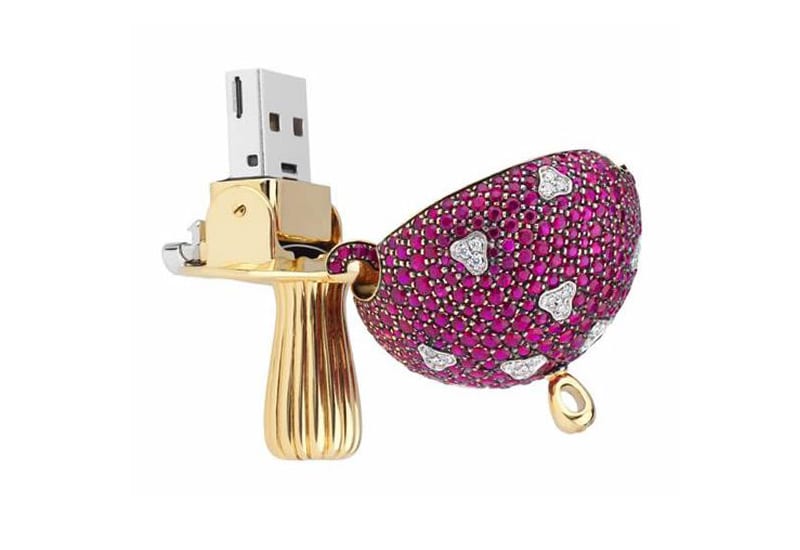
In 2012, Swedish jeweler Shawish Geneva unveiled the world’s first all diamond ring for the grand asking price of 70 million dollars. More importantly, they later additionally unveiled a USB drive inspired by Alice in Wonderland that cost over 36,000 dollars for just 32GB of storage. That’s 1,125 dollars a GB. The mushroom designed drive can be seen in all of its shiny glory below.

Bite for Byte

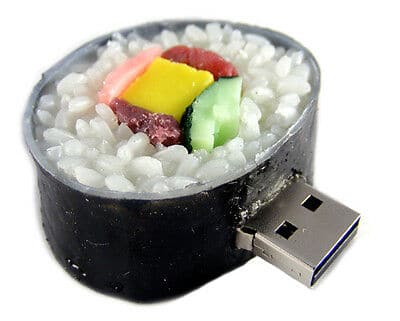
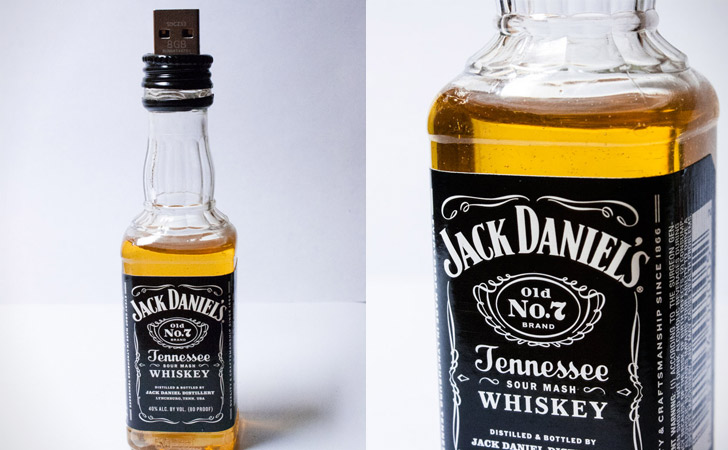
Hungry? Turns out people love to make USB drives that look like food! A small sample on the menu today: watermelon, strawberries, sushi, or maybe even a bottle of Canadian Club or Jack Daniels? Personally, if I had a sushi USB drive I was staring at all the time it would increase my weekly sushi consumption to daily sushi consumption.

Data, Locked and Loaded

Make sure you have the ammunition needed to store your data. These USB devices will give you the feeling of having the firepower to match the speeds of the data you’re transmitting. Want to live in a steampunk world with a Gatling gun? Got you covered. Want to lay down some cover with a grenade? Got you covered for that too.

Do it Yourself

Speaking of all this DIY, why not do your own data destruction yourself while you’re at it? No matter what kind of USB devices you own or how expensive they are (looking at you Sweden), know that SEM has you covered for any and all destruction needs and requirements. Several of our multi-media disintegrators would be the perfect solution to ensure that no one is able to ever pull any information off of old hardware.

Take the SEM Model 200 disintegrator for instance, capable of shredding all USB thumb drives and a variety of other electronic media devices to a particle size as small as 2mm.

Then maybe you can use that shovel USB to bury the remaining shredded pieces out somewhere no one will find. Talk about DiWHY, huh?

How to Properly Handle Information While Working From Home

July 14, 2020 at 9:20 am by Paul Falcone

Working from Home During Covid-19

With respect to the unprecedented times into which the world has unfortunately fallen, many people have had to adapt to working remotely to protect their and others’ health. This change has come with unique challenges for both individuals and organizations, especially those that work with sensitive information, Personally Identifiable Information (PII), and classified information. When working with sensitive data, it’s important that remote workspaces are properly secured to prevent security risks, especially when data breaches can cost a company millions. Here are some tips about working from home in general, and what to do to prevent leaking data.

First and foremost, stay organized.

Sometimes at home, it can be easy to lose track of time. Taking periodic breaks to stretch and eat can be helpful for your mind and body to gather more energy to get back to work. It’s also easy to blend your work environment with your home environment and can start to associate where you live with your job. Make a designated workspace if you can and stick to keeping work there, which will help your brain to switch more easily between work mode and home mode. Create a schedule, whether that be for your lunch and dinner times, or whatever time you wake up. This will help you prioritize your day and ensure your work-life balance is able to stay intact. Lastly, when working from home, your computer is your most valuable asset to completing the job accordingly. Keeping your devices and software updated and making sure all the necessary files are accessible so features can function appropriately is of utmost importance. Any suspicious problems with your computer should be addressed by IT so you can do your job securely.

Develop a policy, get essential gear.

Due to the required stay at home order put in place around the world, Covid-19 has forced many companies to have their employees work from home. This trend in working from home is bound to take off post-coronavirus as companies like Twitter and Google are already allowing their employees to work from home indefinitely. For many, this is a more flexible and comfortable option for those who can do their job on a computer wherever there is Wi-Fi without being in the confines of an office. According to research, 85% of C-suites and 60% of small business owners agree that the risk of a data breach is higher when employees work off-site than when they work at the office. With this uptick trend in working from home, it is critical that employees follow a remote work policy while being equipped with the proper devices to promote safety at home. Apart from establishing a VPN for all remote workers to access their data, a communication plan should be taken into account. Whether that’s Zoom, Skype, Microsoft Teams, or email alone, make sure these new policies are communicated effectively to all parties handling sensitive information daily. Establishing a breach notification process for employees to follow can ensure the problem is addressed as quickly as possible. It will allow the organization to minimize the damage and take preventative action.

The best way to destroy sensitive paper information is with a shredder. For unclassified data, the SEM Model 1324P cross-cut commercial paper shredder is an ideal size to be situated beside your work-from-home desk set-up. Meeting the DIN-66399 level P-4 security level, this device is fantastic for personal use application. For those employees handling classified data, the SEM Model 1324C/3 high security paper shredder is listed on the NSA/CSS Evaluated Product List. This device is also perfect for low volume small areas while meeting DIN-66399 level P-7. Both devices are ergonomically designed, easily maneuvered, and under 50 pounds.

SEM Model 1324/C

It’s impossible to know if/when data will be compromised. But with preventative measures put in place like adopting a shredding policy, the risk is mitigated. It’s a legal and ethical responsibility for all organizations to protect PII and trade secrets within to prevent these potential irreversible breaches. By having a shredder in your workspace, you are taking the step to ensure sensitive data doesn’t fall into the wrong hands. This can help reduce the risks from within for corporate citizens and customers alike.

As always, we’re here if you have any questions. Contact us today to learn more about data destruction while working from home and, more importantly, stay healthy and safe.


Complying with the New CUI Paper Destruction Mandate While Meeting Federal Sustainability Goals

June 18, 2020 at 7:12 pm by Paul Falcone

This new ISOO directive will redefine what it means to keep CUI data, and ultimately the American people, safe. While executive branches and agencies continue to move towards federally mandated and private sustainability goals, as well as update existing equipment to meet the new CUI standards, it is important to know that systems exist that can assist in meeting both targets in a cost-effective manner with the same end-of-life system. 

Fill out the form below for an instant download.

Security Engineered Machinery Releases Information Destruction 101 for Executive Branch Agencies

June 9, 2020 at 1:46 pm by Paul Falcone

Security Engineered Machinery (SEM), global leader in classified end-of-life data destruction, released Information Destruction 101, a comprehensive informational presentation for Executive branch agencies. The presentation breaks down the latest destruction requirements from the National Security Agency’s (NSA) Evaluated Product Lists as well as the Information Security Oversight Office’s (ISOO) latest Notices regarding Controlled Unclassified Information (CUI). SEM released the presentation in response to numerous mandate and classification changes for sensitive information that have occurred over the past two years.

Within the presentation, viewers can learn the latest requirements for the destruction of classified, CUI, and Unclassified materials including paper, optical media (including CDs, DVDs, and BDs), hard disk drives (HDDs), solid state drives (SSDs), and other small electronic media devices. For example, classified and CUI paper must be destroyed to a 1mm x 5mm final particle size, which is outlined in the National Institute of Standards and Technology (NIST) Special Publication 800-88 and referenced by both the NSA and ISOO.

“It can be overwhelming to assimilate the various regulatory requirements for classified, CUI, and sensitive end-of-life data destruction in the federal space,” commented Heidi White, SEM’s Director of Marketing and presenter in the Information Destruction 101. “Providing the most up-to-date information in an easy to digest format seemed like the ideal way to assist our executive agency partners in understanding all of the intricacies of information end-of-life destruction requirements.”

SEM has long been at the forefront of educating both the data destruction industry and the executive branch agencies with whom they partner. Since developing the world’s first disintegrator for the United States Navy over 50 years ago, SEM has been vigilant in developing technology and equipment to meet each new destruction mandate.

“It is our responsibility to our partners around the world that we take the often-complicated wording of government policy and break it down into simple, direct messages,” said Bryan Cunic, Director of Sales at SEM. “We’re happy to have this resource available to anyone for training or educational purposes.”

The presentation can be found on SEM’s website, along with other resources to aid in understanding the NSA’s Evaluated Products Lists, CUI mandates, and other industry information security regulations.

The Case for Mandating End-of-Life Media Destruction in Data Privacy Legislation

at 1:09 pm by Paul Falcone

Data security is an exceedingly complicated and expensive cost center for organizations, while physical end-of-life data destruction is fairly straightforward and inexpensive; yet, many organizations pour millions into data security without considering the disposal of their end-of-life media. 

Fill out the form below for an instant download.

Shredding Bullets and Other Wild (aka Bad Idea!) Destruction Stories

May 8, 2020 at 7:14 pm by Paul Falcone

After over 50 years in business, the SEM service team and service technicians have had some interesting calls to service our machines. After all, our team has travelled all across the world to service these machines for our customers to ensure that they have a long-lasting life of thorough data destruction, so some strange things are bound to happen. So, which of these stories has stood the test of time?

Something Stinks!

One call that came to mind was a service call for a paper shredder that had a jam. The service technician arrived at the scene to get to work, only to find that it wasn’t just a normal jam. As it turns out, there was a disgruntled employee who had thrown a dirty sock into the shredder that caused it to jam. The sock completely ruined the gears and the cutting head inside the paper shredder system as the fabric got wrapped around and slowed it to a jam. That stinks!

Heavy Money

Something that can come to surprise to people is the need to shred currency. As currency ages some is phased out, disposed of, and replaced. At this facility the currency was being prepared to be destroyed in groups of a set weight. In this service call, it was discovered that someone had thrown coins in with bills to make sure the specific package of currency met its targeted weight before being destroyed. The only problem is that the SEM model 1454 disintegrator is not designed to destroy coins, and as they went through the cutting chamber, it sparked and caused a fire to break out amongst the currency that was also being disintegrated.

Remember that it’s not only flammable objects that can create fires but also objects that can create sparks! The sparks themselves may not be dangerous but when you’re shredding paper next to it, things can quickly go up in flames.

Ammunition Disposal

Another service call story happened while our service technician was working on a machine with multiple units on sight. While completing a different job, the service technician noticed that a group of people were loading material into a Model 22 disintegrator nearby, only to hear loud explosions shortly after. The material loaded into the Model 22 disintegrator turned out to be ammunition that had been confiscated and needed to be destroyed. While SEM is proud of how strong our machines are built, no cutting chamber is going to handle live ammunition exploding in the cutting chamber.

Please don’t do this.

Don’t Run (Or Un-Jam Machines) With Scissors

One last story involved a service call to service a paper shredder that had jammed. The customer had tried to troubleshoot the problem independently before consulting SEM by using a pair of scissors to pull out jammed material. The only problem was the machine was still on, and the photo-eye sensor sensed material and began to pull in the scissors that were being used and shredded half of the scissors before the operator could pull them back out. Once the metal went into the paper shredder the cutting head was not only jammed, but now destroyed. Remember to always power down units before attempting to unjam and always consult SEM before going into a machine.

Onto Our Next Call

These are just a few of the stories we gathered here from our service team over the years. While some can be comical, the important thing to remember is that these machines are not invincible, and proper maintenance, upkeep, and care is required to have a long lasting device. The good news is, devices that are maintained and only operated by destroying the approved materials can last decades. Remember, don’t shred bullets.

It’s a really bad idea.

Data Security and Decommissioning in a 5G and Streaming World

February 21, 2020 at 4:38 pm by Paul Falcone

For consumers of digital media and content creators, the 5G rollout is exciting news. For businesses that store and handle data, however, this transition will present some costly, high security risk challenges. Planning now can protect the future of consumers, data centers, and individual companies that host their data in data centers as the transition to the future begins.

Fill out the form below for an instant download.